Tuesday, 20 May 2014

Terminology Abuse - Parameters vs Arguments

In my recent rant about the use of the term “injection” in software development to describe what is really just passing arguments, I slipped up. You can be sure that any blog post that attempts to complain about the (mis)use of terminology is almost certainly going to suffer from it itself, and that post was no exception. Fortunately there are people out there who are all too willing to point this out, and as someone who strives hard to try and use the right words for the right concepts I’m more than happy to be re-educated.

Parameters != Arguments

In my blog post I suggested that the term “injection” was synonymous with passing parameters or arguments and did the usual thing of citing the Wikipedia page on the subject. I had (skim) read that page and had deduced from reading the following sentence that the two terms were interchangeable:-

“These two terms parameter and argument are sometimes loosely used interchangeably...”

This, as @aral kindly pointed out to me is not actually the case. What the Wikipedia page should probably have said (for those of us lazy readers) is this:-

“These two terms parameter and argument are often incorrectly used interchangeably...”

This would (hopefully) have caused me to read it properly [*] and discover that they are two different sides of the same coin. The two terms describe the same concept, but from two different viewpoints - the caller and the callee. The caller passes values to a function described by the term “arguments”, whereas the calling function receives those same values described by the term “parameters”.

My follow-up tweet which attempted to consolidate this simplification into just 140 characters got favourited by @aral and so I take that as a thumbs up that I’ve now finally understood the difference.


[*] The funny thing about reading a page like this when you have a pre-conceived notion of what (you think) it says is that you completely ignore what it is really telling you. Once I understood there really was a difference and went back and read the Wikipedia page again I couldn’t fail to notice that the difference is there, plain as day, all throughout the page! I even went back and checked the page history in case it had been edited recently to make it clearer, sadly for me it’s always been that clear.

Friday, 25 April 2014

Leaky Abstractions: Querying a TIBCO Queue’s Pending Message Count

My team recently had a stark reminder about the Law of Leaky Abstractions. I wasn’t directly involved but feel compelled to pass the details on given the time we haemorrhaged [1] tracking it down...

Pending Messages

If you google how to find the number of messages that are pending in a TIBCO queue you’ll probably see a snippet of code like this:-

var admin = new Admin(hostname, login, password);
var queueInfo = admin.GetQueue(queueName);
var count = queueInfo.PendingMessageCount;

In fact I’m sure that’s how we came by this code ourselves as we didn’t have any formal documentation to work off right at the very start as this was only going in some test code. In case you're curious we were writing some acceptance tests and in the test code we needed to wait for the queue pending message count to drop to zero as a sign that the messages had been processed and we could safely perform our other asserts to very the behaviour.

Queue Monitoring

So far so good. The test code had been working flawlessly for months but then we started writing a new component. This time we needed to batch message handling up so instead of processing the stream as fast as possible we needed to wait for “a large enough batch”, then pull the messages and aggregate them. We could have buffered the messages in our own process but it felt safer to leave them in the durable storage for as long as possible as there was no two-phase commit going on.

The new acceptance tests were written in a similar style to before but the production code didn’t seem to be working properly - the pending message count always seemed to return 0. The pending message count check was just one of a number of triggers that could start the batch processing and so the code lived in a class something like this:-

public class QueueCountTrigger : IBatchTrigger
{
  public QueueCountTrigger(...)
  {
    _admin = new Admin(hostname, login, password);
    _queueInfo = _admin.GetQueue(queueName);
    _triggerLevel = triggerLevel;
  }

  public bool IsTriggered()
  {
    return (queueInfo.PendingMessageCount >=
            _triggerLevel);
  }

  private Admin _admin;
  private QueueInfo _queueInfo;
  private int _triggerLevel;
}

Granted polling is less than ideal but it would serve our purpose initially. This behaviour was most curious because as we saw it similar code had been working fine in the old acceptance tests for months.

The Leaky Abstraction

Eventually one of the team started poking around under the hood with a disassembler and everything began to fall into place. The QueueInfo object returned from the Admin type was just a snapshot of the queue. When subsequent attempts were made to query the PendingMessageCount property it was just returning a cached value. Because the service always started first, after the queue had been purged, it never saw the count change.

Looking at the TIBCO documentation for the classes (and method) in question you’d struggle to find anything that suggests you can’t hold on to the QueueInfo object and get real-time updates of the various queue attributes. Perhaps the “Info” suffix is supposed to be a clue? In retrospect perhaps QueueSnapshot would be a better name? Or maybe it’s documented clearly elsewhere in some kind of design rationale that you’re supposed to read up front?

I can’t remember if it was Steve Maguire in Writing Solid Code or Steve McConnell in Code Complete, but I’m sure one of them suggested that there is no such thing as a black box. Whilst the documentation may describe the interface there are often implementation details, such as performance or caching effects, that are left unspecified and eventually you’ll need to open the box to find out what’s really going on when it doesn’t behave as you would like in your scenario.

Back to the Tests

Looking more closely at the original code for the acceptance tests it made a sub-optimal call which opened a connection every time the message count was requested (just as the example code at the top would do):-

public int GetPendingMessageCount(...)
{
  var admin = new Admin(hostname, login, password);
  var queueInfo = admin.GetQueue(queueName);

  return queueInfo.PendingMessageCount;
}

This was later changed to an inline call, but re-fetched the QueueInfo snapshot the end of every loop iteration. Sadly the author of this change is no longer around so it’s hard to say if this was done after going through the same discovery exercise above, by basing it on a better example from somewhere else, prior knowledge of the problem, or just out-and-out luck.

public int WaitForQueueToEmpty(...)
{
  var admin = new Admin(hostname, login, password);
  var queueInfo = admin.GetQueue(queueName);

  while (queueInfo.PendingMessageCount > 0)
  {
    // Other timeout handling code
    . . .
    queueInfo = admin.GetQueue(queueName);
  }
}


[1] Exaggeration used for dramatic effect.

Thursday, 24 April 2014

What’s the Right Size for a Commit?

Embedded image permalink

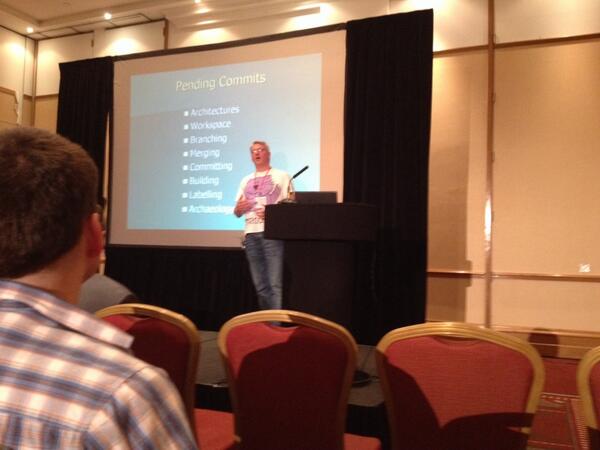
At end of my ACCU 2014 Conference talk this year on Version Control - Patterns & Practices an interesting question came up:-

What’s the right size for a commit?

My answer, which I’ll admit was mostly based on instinct and not through any prior reasoning, was this:-

Something that can be cherry picked.

So that was the short answer, this post is the longer one that leads me to that conclusion…

Single Responsibility Principle

I’ve written before (What’s the Check-In Frequency, Kenneth?) about the effects of fine-grained commits on an integration branch, suffice to say that they cause a lot of noise when you come back to the history to do a spot of software archaeology. In my opinion, if you want to check-in after you get every unit test passing then you should use some kind of private branch. The converse side would be to bundle up so much into a single commit that it would appear as the proverbial Big Ball of Mud.

In essence the advice I gave was nothing more than the application of the age old Single Responsibility Principle as applied to the problem of committing changes to a version control system.

Cherry Picking

The practice of cherry picking changes from one branch to another (often from development to release to squeeze one more feature in) has a bad reputation. I suspect the reason for this is largely down to the breakages and stress it’s caused from incorrectly trying to divorce one single “feature” from the other changes that got made at the same time. Or from not merging all the commits that make up the “logical set” for that feature.

Don’t get me wrong cherry picking is an ugly business that should be avoided if at all possible, but it has its uses and so my approach has always been to  ensure that my commits create small, consistent units of change. Of course I break the build too sometimes and consequently I might have the odd “stray” commit that fixes up the build, but by-and-large each commit should stand alone and add some “value”.

Feature Branches

I very rarely use feature branches because I dislike all the constant merging to and fro, but when I have to the merge at the end usually becomes a single commit to the integration branch. The exception is when I’ve also made a few other changes as a by-product. Whilst the main goal is to implement a specific feature (or fix a bug, etc.) when you’re working on a legacy codebase that lacks any automated test coverage it can save a fair bit of time if the cost of testing can be amortised across a number of changes. This means that during the final merge I need to initially cherry pick a number of other fixes first as individual commits, then merge the remainder (the core feature) as a single commit.

In the integration branch this translates to a series of commits, where each one corresponds to a single feature, it just so happens that they all came from the same source branch. Hence my view is that as long as the “observable outcome” is the same - small, feature-focused commits on the integration branch - it doesn’t really matter too much how they got there. Granted it makes reading the private branch is little more awkward in the future but I feel the saving in development time is often worth the cost.

Feature Toggles

My preference has generally been for continuous integration through the use of feature toggles. This makes integration easier but cherry-picking harder because the entire feature might be spaced out across a number of discrete commits. I often break a feature down into many smaller tasks that can be delivered to production as soon as possible. This means I generally start with any refactoring because, by definition, I cannot have made any observable changes. Next up is the new code, which, as long as I don’t provide a means to access it can also be deployed to production as a silent passenger. That just leaves the changed or deleted code which will start to have some noticeable impact, at least when it’s toggled on. Each one of these steps may be one or more commits depending on how big the feature is, but each one should still be a cohesive unit of work.

From a cherry-picking perspective what we need to know is all the individual commits that make up the entire feature. This is where I’ve found the practice of tagging each commit with the “change request number”. If you’re using something like JIRA then each feature will likely be represented in that system with a unique id, e.g. PROJ-123. Even Trello cards have a unique number that can be used. I usually prefix (rather then append) each commit with the change code as it makes them easy to see when scanning the VCS change log.

Theory and Practice

It might sound as though cherry-picking features is a regular affair because I pay more than lip-service to them. That’s really not the case, I will avoid them like everyone else, even if they appear to be easy. Unless a change is relatively trivial, e.g. a simple bug fix, it’s quite possible that some refactoring on the integration branch will muddy the waters enough to make not doing it a no-brainer anyway.

It’s hard to quantify how much value there would be in any arbitrary commit. If the entire change is a one-line bug fix it’s easier to determine how big the commit should be. When it’s a new feature that will involve the full suite of modifications - refactoring, adding, removing, updating - it can be harder to see how to break it down into smaller units. This is where I find the notion of software archaeology comes in handy because I project forward 12 months to my future self and look back at the commit and ask myself whether it makes sense.


Photo by Thaddaeus Frogley (@codemonkey_uk)

Keeping the Faith Under Pressure

I walked into my client’s offices one day and almost before I had got my coat off I was greeted by one of my client’s architects and told to meet them in a room once I’d got myself composed. Luckily I’d bought my coffee on the way in. In the meeting was my current project’s manager and an enterprise-level architect and he started by saying “Ignore what you’re doing at the moment we have something far more important for you"...

They had a performance problem with one of their new services that was waiting to go into production, but the performance problem was being stubborn to diagnose and so they wanted to know if we could build a simple tactical workaround that would help them move forward with the project in the meantime. The service only needed to do a simple lookup and the data set was around 3 GB. Given that the performance problem was in the infrastructure we came up with a simple in-memory solution that used a binary search so we should easily be able to cope with the necessary 10 ms response time.

All through the meeting the time-sensitive nature for the delivery of this tactical solution was a continuous theme. Basically we had 2 weeks to get it into production, which given the speed of enterprise scale software projects felt really tight, even for something apparently “so simple”. I began to wonder if the mentioning of the short time-scale was a subtle hint to get us to try and drop (or at least reduce) some of our practices, like TDD or refactoring. After all it had taken us two weeks in our current project just to get the continuous integration pipeline up and running! Also the service implementation was far from rocket science as there was virtually no “business logic” to speak of.

Fortunately the answer was a firm “no”. My client also believed that the fastest way to deliver this project was to do it properly, just at we had already been doing on the other one. Past experience suggested that when time was of the essence people sometimes regress to old habits in a belief that they can cut some corners and save time. Tactical solutions, which we all know have a habit of living way longer than anticipated, are particularly susceptible to this kind of thinking.

After 3 days (including the day of the initial meeting) we had the core build pipeline and web API up and running so that we could demo it and, more importantly, so that the downstream team could start coding against it. And we had a decent set of unit and acceptance tests in place, written in a test-first manner. By the end of the week we were good to go as far as the web API aspect was concerned and a few days after that we had written the other tools and scripts we needed to handle the upstream data.

Sadly we didn’t quite make the deadline. But that wasn’t down to the software being late, it was all the other enterprise-y problems, such as getting the staging and production environments built, and testing integration done between the dependent services. This had a knock-on effect on the deployment scripts as infrastructure was reconfigured late in the day.

It’s great that we kept the faith and delivered a time-critical project using all the same practices we used for more lengthy projects as it showed that techniques like TDD and refactoring do not slow you down. Of course what was different this time around as opposed to the start of our main project was that the team knew each other well, we managed to leverage a lot of the knowledge and tools we had gained earlier, such as a shared library of common infrastructure code. We also had logins and permissions that we could reuse rather than have to procure new ones, at least for the development side.

Where we did slow down was in the final deployment and testing in the staging environment. But this should be no surprise because none of us had any experience with this aspect of the development process with that particular client. Consequently many of the “non-functional” requirements such as deployment, logging and performance monitoring needed heavy tweaking to fit in with their operations model. We had prepared as much as we could from experience but every enterprise is slightly different.

It feels silly now to have even doubted my client’s loyalty to our development process. They may still have many other classic enterprise traits but at least a lack of faith in agility is not one of them.

Wednesday, 23 April 2014

Terminology Overdose

I’ve never been a fan of dependency injection frameworks, but what really bugs me most is the use of the term “injection”. It grates on me when I hear programmers talking about using “constructor injection” or “setter injection”. Sorry, but what you’re talking about is “passing parameters”, or if you prefer “passing arguments”. It’s bad enough that we already have two terms for the things we provide to a function to vary how it behaves, why do we need a third?

Just think about it for a moment, what exactly does “injection” mean? It’s a finely-controlled way to force a substance into some other material. Does passing a parameter sound like anything out of the ordinary? No. Now, if the framework used reflection to set a private member variable because there was no natural way to do it, then I’d be happier with the term. But only for that use case. Maybe that’s how these frameworks started out, but it sure isn’t what seems to be going on these days.

So let’s be clear, designing a class that depends on another which is typed via an interface rather than a concrete class is not anything new. It’s just the age old advice about Programming to an Interface, Not an Implementation, but taken quite literally. The fact that you pass the dependent object via the constructor [1] is just Programming 101, it doesn’t need any sort of fanfare.

[1] Although you could use a setter, don’t.

Thursday, 20 March 2014

Finding an Alternative to Is- and Has- in PowerShell

I’ve been playing with PowerShell script modules as a way of factoring out a load of boilerplate PowerShell code into a re-usable library. These functions generally revolve around error handling, logging and command-line parsing at the moment. One issue I quickly ran into was the Import-Module call failing with a warning about badly named functions:-

WARNING: Some imported command names include unapproved verbs which might make them less discoverable. Use the Verbose parameter for more detail or type Get-Verb to see the list of approved verbs.

Whilst I was sort of aware that there were a standard set of verbs in PowerShell I haven’t really paid that much attention to the practice as most of my scripts are standalone. Naturally the usage of a PowerShell module implies code-sharing and so I can see why the warning exists. It also forces me to re-evaluate my laziness.

Is- and Has- Verbs

I started by Googling what the standard verbs were and discovered that in a few cases they explicitly provide alternatives (e.g. Search instead of Locate), but there was no PowerShell Thesaurus to help me understand what I should be using in place of the Is-Xxx and Has-Xxx functions I’d written. As an example here is the original function I wrote for detecting if the user has provided a specific command line switch:-

function Is-SwitchSet($options, $switch)
{
    if ( $options | where { $_ -eq $switch }  )
    { $true } else { $false }
}

if (Is-SwitchSet($args, ‘--help’))
{
    . . .
}

I originally played around with the naming and ended up with Has-Switch as that seemed shorter and closer, but I was still aware it wasn’t right because at the time I didn’t know of any other cmdlets that started Is- or Has-.

Noun-Verb versus Verb-Noun

As an aside I think what makes this more difficult is that the naming convention in PowerShell is the reverse of what you’d do in an object-orientated language like C++ or C#. Given that I’ve been doing that for close to 20 years its a hard habit to break. For example, in PowerShell, I always want to write Path-Exists, which would became Exists-Path, which is wrong (on many levels) but also exactly how you’d write it in a batch file.

C# PowerShell
Path.Combine Join-Path
Path.Exists Test-Path

Set Membership

I started looking for the closest verb that I felt would be appropriate by scanning the list from Get-Verb. I was expecting to see something in the Data category related to set membership - some kind of verb relating specifically to existence / containment but I didn’t see anything. There is Find, Search and Get but all these return an object and I just want to return a boolean value indicating its presence or absence. In the Lifecycle category there is Assert and Confirm, but Assert-SwitchExists or Confirm-SwitchExists doesn’t sound right either.

Obviously I noticed early on that the equivalent of the Path.Exists() method was the Test-Path cmdlet. It seems like the only candidate that might be expected to provide a boolean response but its categorisation in the Diagnostics section makes it feel more heavyweight to me than a simple existence check in a container. I know these are only guidelines but if the point of standardising the verbs is to make them more discoverable then I don’t see Test-Switch really works and Test-SwitchExists just feels like a tautology.

Conclusion

In the end I felt dissatisfied with all the alternatives and so I just appended a “-WarningAction SilentlyContinue” to the Import-Module statement to make the warning go away, for now. I’m sure I’m missing something obvious here and I just need to play with the (English*) language a bit more, or perhaps I’m not “getting” the (PowerShell) language and should just expect the user to rely on a boolean conversion from the result of using Where-Object?

[*] Despite it supposedly being my native language I’m under no illusion that I know how to weald it correctly.

Thursday, 9 January 2014

Cleaning the Workspace

I have a habit - I like a clean workspace. No, I don’t mean my office desk or worktop in the kitchen but the workspace where I make my code changes. In ClearCase it was called a view and in Subversion the working copy, i.e. the place where you edit your code, merge, build it, run tests, etc.

Whilst I’m making the edits I don’t mind what state it’s in. But, when it comes time to integrate my colleague’s changes - merge, build and run the smoke tests before committing my own - I want the workspace spotless. I don’t want to see any residual files or folders lying around that might have the effect of tainting the codebase and giving me that “well, it works on my machine” excuse. When I’ve pushed my changes I fully expect the build machine to remain green and my colleagues to suffer no unnecessary interruption.

Back at the start of last year I wrote a post called “Layered Builds” that had the following outline of what I’d expect a Continuous Integration process to use:-

“For repeatable builds you need to start with a clean slate. If you can afford to that would be to start from an empty folder and pull the entire source tree from the version control system (VCS). However, if you’re using something like ClearCase with snapshot views, that could take longer than the build itself! The alternative is to write a “clean” script that runs through the source tree deleting every file not contained in the VCS repo, such as the .obj, .pdb, .exe, etc. files. Naturally you have to be careful with what you delete, but at least you have the VCS repo as a backup whilst you develop it.”

This “clean script” that I’m referring to is nothing more than a batch file that does a bunch of deletes of files and folders, e.g.

del /s *.ncb 2> nul
del /s *.obj 2> nul
del /s *.pdb 2> nul
. . .
for /d /r %d in (obj) do rmdir %d 2> nul
for /d /r %d in (bin) do rmdir %d 2> nul

For a more concrete example look at the script contained in my Build Scripts (or directly on GitHub).

Note that whilst I might do a recursive delete (del /s) of a build artefact like a .obj file, I almost never do a recursive delete of the artefact folders. This ensures I only clean up the actual build output and not any log files, batch files, test results or other stuff I might have created as part of my ongoing changes.

Build Detritus

My current project uses Jenkins and MSBuild, neither of which I’d used before, so someone else set up the skeleton of the build. Although the initial steps blew away the output folders, anyone who has ever used Visual Studio will know that its idea of “clean” falls way short of “spotless”. It caches a lot of data such as metadata like the .ncb files that Visual C++ uses for IntelliSense, intermediate build data like the header files generated via the #import statement right up to entire 3rd party packages pulled from NuGet. None of this stuff gets blown away if you do a “Clean Solution” from Visual Studio.

Of course the metadata, like where my breakpoints point to (.suo) and the IntelliSense data (.ncb) should have absolutely no effect on the compiled binary artefacts. However a product like Visual Studio is a complex beast and it’s not always apparent what detritus contains build dependent data and what doesn’t. Sometimes “stuff” just gets corrupted and you need to blow the lot away and start again [1]. So instead I err on the side of caution and try and remove as much as possible as often as possible without adversely affecting my productivity. Given the modern preference for short feedback loops it turns out there is very little I ever carry over from one integration to the next; except perhaps the occasional breakpoint or debugging command line.

Old Habits Die Hard

Like all habits you need to remind yourself why you’re doing it every now and again to ensure it still has value - perhaps all those weird build problems are now a thing of the past and I don’t need to do it anymore. Depending on your point of view, the good thing about being someone that religiously cleans their workspace before every integration means that you stand a good chance of being the one that finds the build problem the others didn’t know existed. On my current project the build machine also turned out to be ignorant…

One problem that I kept hitting early on was incorrectly configured NuGet package dependencies. ReSharper has this wonderful feature where it will automatically add the assembly reference and namespace “using” declaration when you start writing some code or paste in code from another assembly. The problem is that it’s not clever enough - it doesn’t fix up the NuGet package configuration when the reference is to a NuGet sourced assembly. Consequently other developers would let ReSharper fix up their build, but when I used my clean script and blew away the NuGet package cache the build might then fail as the assembly could be earlier in the build order and the package might not have been cached at that point. Another problem was the C# code analysis step failing with a weird error if you cut-and-pasted the build configuration and ended up pointing to a stale analysis output file that then doesn’t exist the moment you clean up after yourself.

Continuous Integration

The build machine should have been the one catching any problems, but it was never configured to wipe the slate clean before every build. Given that we were using Jenkins, which is pretty mature and has a mountain of plug-ins, I investigated what the options were. There is a plug-in to clean the workspace before running a job that I’ve since started using on all the other non-Git-repo related jobs. This picked up a couple of minor issues where we had been relying on one deployment overwriting another. We’d also been incorrectly analyzing a stale TestResults.xml file from the unit test run which nobody had spotted.

This plug-in works great except when the cost of recreating the workspace is high, such as in the case of the initial compilation step. The “master” Git repo we’re using is hosted remotely and has of late been suffering from a number of DDoS attacks [2]. That, coupled with its ever growing size means it takes some time to keep cloning the entire repo on every build. Consequently we now have our own step at the start of the build that runs our clean script instead. Yes, as I discovered later, I could have used “git clean -x -d -f” [3] to do the same job; however it has always been on the cards that we would move to another VCS where this won’t be an option so I maintain the script instead.

Clean or Spotless?

This need to distinguish between merely “clean”, i.e. all build artefacts and non-user state removed, and “totally spotless”, where it’s the same as if you’d just cloned the repo, helps avoid some other ugly side-effects caused by auto-generated files.

Visual C# lacks the ability to mark a .cs file as generated, which is exactly what we do to inject the build number via a AssemblyVersionInfo.cs file. As a consequence when you open Visual Studio you get little warning symbols on all these files telling you the file is missing, which is irritating. More annoying though is the popup dialog we get every time we open the solution when the web.config is missing because that’s also auto-generated.

This means that some files I’d prefer to be cleaned up by default are now only purged if the “--all” switch is specified.

Habit Justified?

Like many of the habits programmers adopt, the problems this particular one unearths would likely be unearthed later anyway. The question is how much later and consequently how much longer would it take to diagnose and fix when it does finally appear? The longer the time between a mistake and its discovery the harder it can become to pinpoint. This is especially true when you didn’t make the change yourself and you have a mental attitude of always blaming your own recent changes first rather than assuming someone else is at fault.

I still don’t think it costs me much time and ultimately the team wins which is what I think is more important.


[1] This used to be a common problem with Visual C++. If Visual C++ started crashing randomly, then binning the .ncb and other cached data files usually did the trick. I eventually found that Visual C++ was generally pretty solid if you disabled the Navigation Bar at the top of the source files and never touched the Class Wizard. Fortunately things are much better these days (VC++ 9.0 was the last version I used on a daily basis).

[2] The beauty of Git is that, in theory, if the remote repo is down for any length of time we could just clone a repo on the build server and treat that as our new master until the remote one is back. Or we could just push changes between ourselves if the need really arose. In practice outages of any kind (local or remote) can been counted in hours which even The Facebook Generation can cope with.

[3] This is the first time I’ve used Git and historically the version control systems I’ve used didn’t even allow you to ignore files (PVCS, SourceSafe, ClearCase) let alone provide support for resetting your workspace!